
How the Capital One Shopping Browser Extension Can Save You Money
We may earn money or products from the companies mentioned in this post. This means if you click on the link and purchase the item, I will receive a small commission at no extra cost to you ... you're just helping re-supply our family's travel fund.
Capital One Shopping is a free way for online shoppers to check for coupons, lower prices, and eligible rewards without changing their usual shopping routine. It is worth trying if you shop online and want a quick way to check for possible savings during a purchase you already planned. Offers and rewards depend on the retailer and whether your purchase qualifies.
The extension can check for available deals while you shop, so you do not have to search each store yourself. It adds a convenient check, not a promise of savings on every order. Start with a purchase you already planned and compare the checkout total after any available offer is applied.
Key Takeaways
- The extension is free to use, even if you are not a Capital One customer.
- At participating stores, it can test coupon codes during checkout.
- Price comparisons and alerts can help you check other offers.
- Some eligible purchases earn Shopping Rewards, which redeem for gift cards.
- Rewards are not cash or credit card statement credits.
- Review the data disclosure and site permissions before enabling access.
How the Capital One Shopping Browser Extension Finds Savings
A checkout coupon test can save the time of trying codes one by one, while a valid code can reduce the amount due. The free extension searches for coupons, better prices, and rewards at over 100,000 online retailers, though not every store or item qualifies.
At participating retailers, it tests coupon and promo codes at checkout. A working code may lower your cart total before you pay. Price comparisons at certain retailers can account for shipping costs and membership pricing, which gives you more context than the listed price alone.
Check the final cart total, since a listed price may not include shipping or membership costs.
These checks can help you make a quick choice without opening several store pages. The extension may also notify you when the price drops on an item you have viewed.
- Coupon codes tested at checkout
- Lower-price comparisons at certain retailers
- Shipping and membership pricing included in some comparisons
- Price-drop notifications for viewed items
Automatic coupon and promo code checks
Coupon testing works at checkout, where the extension can try available codes on your cart. A code that works may cut the amount due; an expired or ineligible code will not.
That can spare you the chore of copying codes from deal pages and testing them yourself. It also keeps the result tied to your actual cart, where item rules and store terms apply.
Price comparisons and price-drop alerts
At certain retailers, comparisons include shipping and membership pricing, so the lowest listed item price may not be the lowest final cost. Viewed items may also trigger an alert if their price drops.
Alerts are useful when you can wait before buying, but they do not mean every item has a lower offer available. For broader checkout ideas, see ways online stores can make checkout clearer.
Store coverage and consumer reviews
Capital One Shopping says its coverage spans more than 100,000 online retailers. Store participation and the offers available can differ, so treat that figure as broad coverage rather than a guarantee for every purchase.
Capital One Shopping browser extension reviews vary by platform. The Chrome Web Store lists a 4.1 rating from 18.1K ratings, updated daily, while Apple’s App Store lists 4.9 from 1.7M ratings. Google Play shows 4.7 from 99.1K reviews.
Reviews also report outdated coupons, missed lower prices, and slower browser performance. For a quick first test, use a retailer and item you already planned to buy.
How Do Eligible Purchases Become Gift Cards?
Eligible purchases through partner sites can earn Shopping Rewards, which are redeemed for digital gift cards rather than cash. These rewards are separate from card rewards, and you may earn both on the same purchase when it qualifies.
Shopping Rewards redeem for gift cards, not cash or credit card statement credits. Eligible rewards typically post after the retailer’s return window closes. A Capital One rewards credit card is not required, and its own rewards can still apply to the purchase.

The reward process has four steps:
- Shop through an eligible partner offer.
- Wait for the retailer’s return window to close.
- Redeem eligible rewards for a digital gift card.
- Allow up to three business days for the gift card to appear.
The Capital One Shopping login gives you access to your account and rewards balance. The Capital One Shopping website also provides access to your service account and its rewards information.
Once redeemed, a digital gift card can take up to three business days to appear in your account. Shopping Rewards do not expire while your account remains active and in good standing.
If you are weighing card points against other perks, these tips for using travel credit card points cover a different kind of reward. Choose a gift card from a retailer where you expect to spend the balance.
What Does the Rewards Dashboard Show?
The dashboard separates a lifetime summary from the amounts and statuses attached to individual transactions. Lifetime Rewards & Savings and Available Rewards are account-level summaries, while each row tracks one activity.
The pictured account lists 186 transactions, $2,187.34 in Lifetime Rewards & Savings, and $289.00 available in Shopping Rewards. Those summary boxes do not make every transaction amount a current balance. Rows can include a merchant, date, reward type, source, purchase amount, savings, rewards, and status.
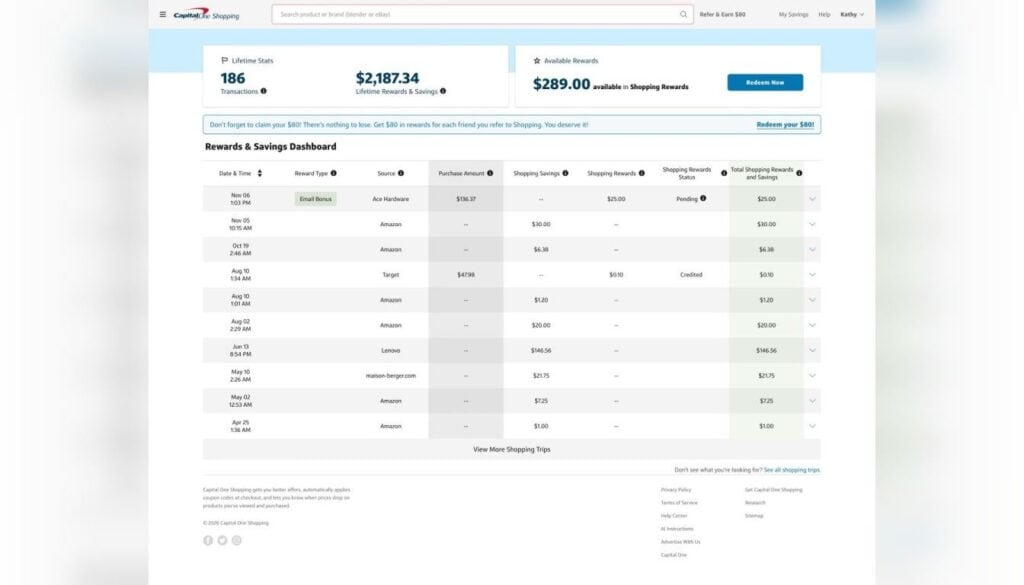
The transaction examples below keep Shopping Savings and Shopping Rewards in separate columns. A blank mark means the pictured row did not show a value for that field.
| Date & merchant | Purchase Amount | Shopping Savings | Shopping Rewards | Shopping Rewards Status |
|---|---|---|---|---|
| Nov 06, Ace Hardware | $136.37 | Not shown | $25.00 | Pending |
| Nov 05, Amazon | Not shown | Not shown | $30.00 | Not shown |
| Oct 19, Amazon | Not shown | Not shown | $6.38 | Not shown |
| Aug 10, Target | $47.98 | Not shown | $0.10 | Credited |
| Aug 02, Amazon | Not shown | Not shown | $20.00 | Not shown |
The Ace Hardware entry is labeled Email Bonus, and the Target row shows a purchase amount, Shopping Rewards, and Credited status. The Amazon entries list Shopping Rewards, not Shopping Savings.
An additional Aug 10 Amazon row lists $1.20 in Shopping Rewards. A Jun 13 Lenovo row appears with the purchase amount shown as –.
The dashboard also displays a referral prompt offering $80 in rewards for each friend referred and saying “Redeem your $80.” That prompt is an offer shown in the pictured account, not a claim about a current referral offer.
Use the Lifetime Stats boxes for the account-level view and the transaction rows to identify a particular purchase.
What Does Free Mean for Cost and Privacy?
There is no service fee, and a Capital One bank or credit card account is not required. Merchants may pay affiliate commissions, which Capital One Shopping shares with users as Shopping Rewards.
Free use does not remove purchase eligibility rules or data collection. The app disclosure lists information that may be collected and linked to your identity, along with other data that may not be linked.
How the free service earns revenue
Capital One Shopping is free for Capital One customers and people who do not bank with Capital One. The service earns revenue when merchants pay affiliate commissions on qualifying activity.
Some of that commission may be shared with users as Shopping Rewards. A free service can still have rules about which purchases qualify, so a commission does not mean every order earns rewards.
What the app disclosure says about data
The app disclosure says purchases, financial information, contact information, search history, browsing history, identifiers, and usage data may be collected and linked to your identity.
It also lists location, user content, and diagnostics as data that may be collected but not linked to your identity. Identifiers may be used to track users across apps and websites owned by other companies.
Google Play’s data-safety listing says data is encrypted in transit and that users can request data deletion. Those details do not replace your own review of the privacy policy and requested permissions.
The main catch is the trade-off: no service fee, but rewards have eligibility limits and the app can collect information about use. Review the permissions and privacy policy before allowing the extension to access sites you visit.
How Do You Install It on Your Browser or Phone?
Choose a supported browser for desktop shopping or the Capital One Shopping app for iOS and Android. The extension works with Google Chrome, Mozilla Firefox, Microsoft Edge, and Safari, while the phone app supports iOS and Android devices.
On iPhone, you need iOS 16.6 or later and must add the Safari extension through the app. Safari shopping also requires allowing that extension to access all sites.
This table lists the desktop browser routes and the iPhone Safari setup note.
| Browser | Supported | Access route | Setup note |
|---|---|---|---|
| Google Chrome | Yes | Browser extension | Install and allow requested access |
| Mozilla Firefox | Yes | Browser extension | Install and allow requested access |
| Microsoft Edge | Yes | Browser extension | Install and allow requested access |
| Safari | Yes | Browser extension | On iPhone, add through the app and allow all-site access |
Add the extension to a supported desktop browser
Install the extension in one of the supported desktop browsers, then create an account or sign in. Review the access request and allow the browser permissions you choose to grant.
Use this short checklist to get started:
- Choose a supported browser or phone app.
- Install the extension or app.
- Create an account or sign in.
- Allow the requested browser access.
Set up shopping on an iPhone or Android device
The Capital One Shopping app is available for iOS and Android. On iPhone, install the app, add its Safari shopping extension, and allow access to all sites.
The iPhone app requires iOS 16.6 or later and uses 215.1 MB. Android shoppers can install the available app on a supported device.
If the Capital One Shopping browser extension is not working, first confirm the browser is supported, the extension is enabled, and site access is allowed. If the extension does not appear during checkout, confirm it is enabled and allowed on that site.
Conclusion
For online shoppers who want an easier way to check for discounts, the free extension is a practical tool to try. It can test available coupons and compare prices while you shop, without requiring a Capital One bank account.
Results depend on the store, offer, and purchase, so treat each check as a chance to save rather than a promise. Start with a planned purchase and see whether the final cart total changes.
Install Capital One Shopping through capitaloneshopping.com and use it the next time you shop online.